

Are you struggling to get the most out of your Waterboss water softener? Setting it up correctly can save you money, protect your plumbing, and give you softer, cleaner water every day.
But with all the settings and options, it’s easy to feel overwhelmed or unsure if you’re using it right. This guide will walk you through the essential Waterboss water softener settings, so you can customize your system to fit your home’s needs perfectly.
Keep reading to unlock the full potential of your water softener and enjoy the benefits of soft water without any hassle.
Waterboss Softener Basics
The Waterboss water softener is a popular choice for homes with hard water. It helps reduce minerals that cause scale and damage pipes. Understanding the basics of this softener makes it easier to set up and maintain. This section explains how it works and its key parts.
How It Works
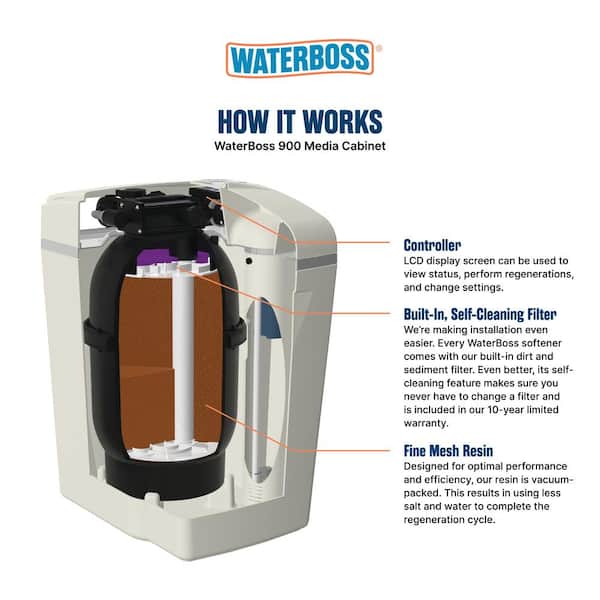
The Waterboss softener removes hard minerals like calcium and magnesium. Water flows through a tank filled with resin beads. These beads attract and hold the minerals. Clean water then moves out to your home’s pipes.
The system regenerates by flushing the minerals away with a saltwater solution. This process keeps your water soft and your softener working well.
Key Components
The main parts include the resin tank, brine tank, control valve, and timer. The resin tank holds beads that soften the water. The brine tank stores salt needed for regeneration.
The control valve directs water flow during softening and cleaning. The timer controls when regeneration happens. Each part works together to provide soft water efficiently.
Setting Water Hardness
Adjusting the water hardness setting on a Waterboss water softener helps control the amount of minerals removed. Correct settings protect pipes and improve water quality. This keeps your water soft and your system running smoothly.
Testing Your Water
Setting the right hardness level starts with testing your water. Hard water contains minerals like calcium and magnesium. These minerals cause scale buildup in pipes and appliances. Use a water test kit to find your water hardness.
Test kits are easy to use and give quick results. Take a sample from your tap and follow the test instructions carefully. The hardness level is usually shown in grains per gallon (gpg) or parts per million (ppm).
Adjusting Hardness Levels
After testing, set your Waterboss softener to match the hardness level. Most models have a control panel to adjust settings. Enter the hardness number from your test results.
This tells the softener how much mineral to remove. Setting it too low wastes salt and water. Setting it too high leaves minerals in the water. Aim for the exact hardness to get soft water and save resources. Make changes slowly and check water quality after each change.
Regeneration Frequency
Regeneration frequency is a key setting on your Waterboss water softener. It controls how often the system cleans itself. Proper regeneration keeps the softener working well. It removes hardness minerals from the resin beads. This process is important to keep water soft and appliances safe.
Setting the right regeneration frequency saves salt and water. It also extends the life of your softener. The frequency depends on water hardness, household size, and daily water use. Adjusting this setting ensures efficient operation and soft water supply.
Choosing The Right Cycle
Choose a cycle based on your water hardness and usage. Harder water needs more frequent regeneration. Larger families usually require shorter cycles. Smaller households can set longer intervals between regenerations. Check your softener manual for cycle options. Try different settings to find what works best for you.
Impact On Softness And Efficiency
Frequent regeneration keeps water very soft. But it uses more salt and water. Infrequent regeneration saves resources but may reduce softness.
The resin beads can get saturated with minerals. This lowers the softener’s ability to clean water. Balancing frequency improves both water quality and system efficiency. Regular checks help keep settings optimal.
Credit: www.homedepot.com
Salt Settings And Usage
The salt settings and usage of your Waterboss water softener play a key role in its performance. Correct salt use helps the system work well and saves salt. It also keeps your water soft and fresh.
Adjusting salt settings properly reduces waste. This makes your water softener last longer. Understanding the right salt type and amount is important for good results.
Types Of Salt Compatible
Waterboss softeners work with different salt types. The common types are pellet, crystal, and block salt. Pellet salt is pure and dissolves fast. Crystal salt contains larger grains and may leave residue. Block salt lasts long but dissolves slower.
Choose salt that fits your model and water hardness. Use high-purity salt to avoid damage. Avoid salt with too many impurities. This keeps your system clean and efficient.
Optimizing Salt Consumption
Setting the right salt level saves money and salt. Check your water hardness to set salt use accurately. Use the control panel to adjust salt dose. Lower salt use saves resources but must still soften water well.
Regularly clean the brine tank to stop salt buildup. Use salt that matches the water softener’s recommendations. Monitor salt levels and refill before it runs low. This keeps the softener working smoothly.
Customizing Water Softness
Customizing water softness allows you to control how soft or hard your water feels. This adjustment helps protect your pipes and appliances. It also improves how your soap and detergent work. Finding the right softness level makes daily tasks easier and better for your skin and hair.
Adjusting Softness Levels
Waterboss water softeners let you set the softness level easily. Use the control panel to increase or decrease softness. Higher softness means less minerals like calcium and magnesium. Lower softness keeps some minerals in the water. Choose a level that fits your needs and water quality.
Balancing Softness And Mineral Content
Soft water can feel slippery but may lack some healthy minerals. Hard water has more minerals but can cause buildup in pipes. Balancing these helps keep water good for drinking and cleaning. Adjust settings to keep some minerals while reducing hardness. This balance protects your home and health.
Troubleshooting Common Issues
Troubleshooting common issues with your Waterboss water softener can save time and avoid costly repairs. Many problems come from simple causes. Understanding these helps keep your system running smoothly. Below are some frequent issues and easy fixes.
Softener Not Working Properly
Check the power supply first. Make sure the unit is plugged in and the circuit breaker is on. Look at the control panel for error messages or blinking lights. These signals often point to specific problems.
Inspect the settings. Incorrect time or hardness level can affect performance. Reset the controls to match your water hardness. Also, check the bypass valve. It should be fully open for softening to work.
Clean the resin tank if you see reduced water softening. Resin beads may get dirty or damaged over time. Follow the manufacturer’s instructions for cleaning or replacing the resin.
Salt Bridges And Salt Mushing
Salt bridges form when salt hardens and creates a crust in the brine tank. This stops salt from dissolving properly. Tap the sides of the tank gently to break the crust. Use a broom handle to carefully break large bridges.
Salt mushing happens when salt granules dissolve and recrystallize at the bottom. This creates a thick layer that blocks salt flow. Remove the mush by scooping it out. Avoid overfilling the tank to prevent this issue.
Use high-quality salt to reduce salt bridging and mushing. Check the salt level monthly to keep the softener running well. Regular maintenance helps avoid these common problems.
Maintenance Tips
Proper maintenance keeps your Waterboss water softener working well. Regular care helps avoid problems and extends the device’s life. Follow simple steps to keep soft water flowing smoothly in your home.
Regular Cleaning
Clean the brine tank every few months to stop salt build-up. Remove old salt and debris to keep the system fresh. Wipe down the inside to prevent blockages. Rinse the tank well before adding new salt.
Check the resin bed for dirt and hard water deposits. Use a resin cleaner to keep it effective. Clean the venturi valve and nozzle often. These parts help the system regenerate properly.
Replacing Parts When Needed
Inspect parts like the brine valve, seals, and hoses regularly. Look for cracks, leaks, or wear that can cause issues. Replace worn parts quickly to avoid bigger problems.
Change the resin beads every few years if softening drops. Use original parts for best fit and performance. Keep a simple toolkit ready for easy part swaps.
Advanced Settings
The advanced settings on your Waterboss water softener let you customize how it works. These settings help you save water and salt by controlling when and how the system cleans itself. Adjusting these options can improve your water quality and lower your utility bills.
Time Of Day Regeneration
The Time of Day Regeneration setting lets you pick the exact time for the softener to clean itself. Most users set this at night when water use is low. This way, the system won’t disturb your daily water supply. Setting the right time helps the softener work quietly and efficiently.
Delayed Regeneration Features
Delayed Regeneration allows the softener to wait before starting the cleaning cycle. This feature helps avoid running the cycle during busy water use times. It also prevents waste by starting regeneration only when needed. You can set the delay time to fit your household routine.

Credit: waterestore.ca
Frequently Asked Questions
How Do I Set The Waterboss Water Softener Timer?
To set the timer, access the control panel and press “Set Time. ” Use arrows to adjust hours and minutes. Confirm with the “Enter” button. This ensures regeneration occurs at your preferred time, optimizing softener performance and saving energy.
What Is The Ideal Salt Setting For Waterboss Softeners?
The ideal salt setting depends on water hardness and usage. Start with the default setting, then adjust based on water test results. Lower settings save salt but may reduce efficiency. Higher settings increase regeneration but use more salt.
How Often Should Waterboss Regenerate?
Waterboss typically regenerates every 3 to 7 days. The exact frequency depends on water hardness and household water use. Regular regeneration keeps water soft and prevents mineral buildup. You can adjust settings for optimal timing.
Can I Adjust Waterboss Hardness Settings Myself?
Yes, you can adjust hardness settings via the control panel. Input your water hardness level, usually measured in grains per gallon. This helps the softener use the correct salt amount and regeneration cycle length for efficient operation.
Conclusion
Setting your Waterboss water softener correctly keeps your water clean and soft. Check the hardness level of your water first. Adjust the settings to match this level for best results. Regularly review the timer and salt settings. This helps the softener work efficiently every day.
Clean the system as recommended to avoid problems. Proper care saves you time and money. Enjoy softer water that is good for your skin and appliances. Simple steps make a big difference in your water quality. Keep these tips in mind for smooth operation.


[…] normally. If the E1 code remains, repeat the previous checks. Waterboss e1 error reset helps the softener refresh its settings. Do this after fixing salt and water supply […]