
Is your water softener acting up or not working like it used to? Knowing how to reset your water softener can save you time, money, and frustration.
Whether your system is stuck, not regenerating, or just needs a fresh start, a quick reset might be all it takes to get things flowing smoothly again. In this guide, you’ll discover simple, step-by-step instructions to reset your water softener easily—no technical jargon or complicated tools needed.
Keep reading, and you’ll have your water softener running like new in no time.
Signs Your Water Softener Needs Resetting
Knowing the signs that your water softener needs resetting helps keep water quality high. A reset can fix many common problems. Watch for clear signals from your system.
Reduced Water Softness
Water feels hard or leaves spots on dishes. Soap does not lather well. Clothes may feel rough or stiff after washing. These signs show the softener is not working right. It might need a reset to start softening again.
Unusual Noises
Strange sounds come from the softener unit. Grinding, clicking, or humming noises are not normal. These sounds can mean the system is stuck or parts are misaligned. Resetting the unit often stops these noises and restores normal function.
Salt Bridge Formation
A hard crust forms in the salt tank. This crust blocks salt from dissolving in water. The softener cannot regenerate properly without salt. Breaking the salt bridge and resetting the softener fixes this issue and helps the unit work correctly.

Credit: www.faenzacalcio.it
Preparing For The Reset
Preparing for a water softener reset is important for a smooth process. This step helps avoid mistakes and saves time. Before starting, make sure you have everything ready and understand the process.
Gathering Necessary Tools
Collect the tools needed to reset your water softener. Usually, you need a screwdriver and a flashlight. Sometimes, a small wrench is useful. Having these tools ready makes the reset easier and faster.
Checking Salt Levels
Look inside the salt tank of your water softener. Check if the salt level is low or empty. Low salt can cause problems with softening water. Fill the tank with the right type of salt if needed. Proper salt levels help the system work well after the reset.
Turning Off Power And Water Supply
Before resetting, turn off the power to the water softener. This stops the machine and keeps you safe. Also, close the water supply valve to stop water flow. These steps prevent leaks and damage during the reset process.
Manual Reset Steps
Resetting a water softener manually helps fix common issues fast. It makes sure the system works well and softens water properly. Follow these clear steps to reset your water softener without trouble.
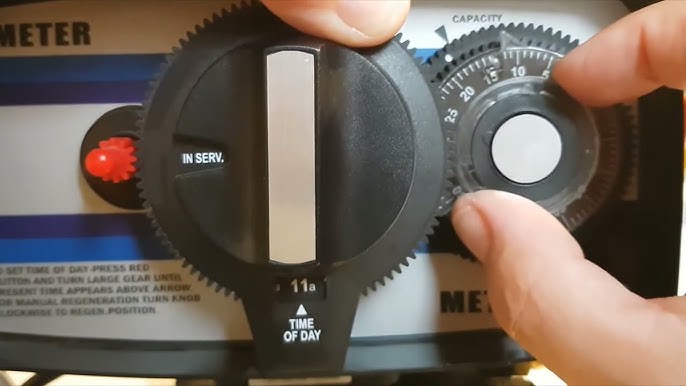
Locating The Control Panel
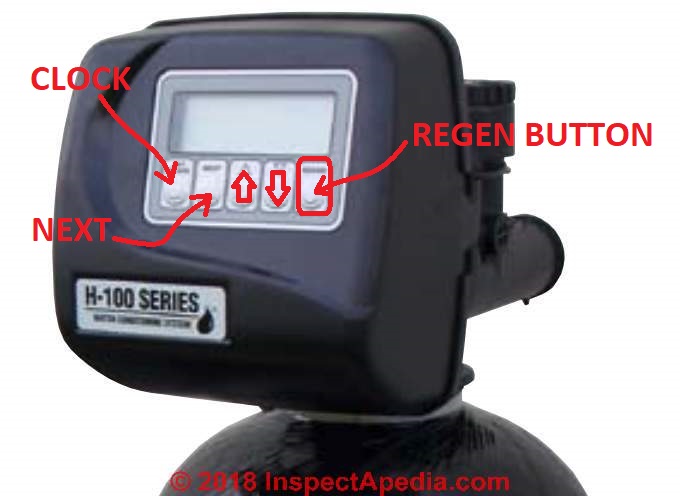
First, find the control panel on your water softener. It is usually on the front or top of the unit. The panel has buttons and a small screen. This is where you will start the reset process.
Initiating The Regeneration Cycle
Press the button labeled “Regenerate” or “Manual Regeneration.” This starts the cleaning and recharging of the resin beads inside. The cycle can take 1 to 2 hours. The machine uses salt to remove hardness from water during this process.
Adjusting Settings If Needed
Check the settings on the control panel after the reset. Adjust the time, hardness level, or salt setting if needed. Setting the right hardness level helps the softener work better. Save any changes before exiting the panel.
Credit: www.youtube.com
Automatic Reset Procedures
Resetting a water softener can be simple with automatic reset features. Many modern softeners have built-in systems to make resetting easy. These automatic reset procedures save time and effort. They help keep your water softener working well without manual settings.
Understanding Your Model’s Features
Each water softener model has unique features. Check your user manual for reset instructions. Some models reset automatically after a power outage. Others need you to press a reset button. Knowing your model’s features helps avoid mistakes. It also prevents damage to the softener system.
Using The Reset Button
Most automatic water softeners have a reset button. This button often clears error codes and restarts the system. Press and hold the button for a few seconds. The display or indicator lights may flash to show the reset. Release the button and wait for the softener to respond. Do not press other buttons during this process.
Waiting For The Cycle To Complete
After resetting, the water softener starts a new regeneration cycle. This cycle cleans and recharges the resin beads inside. It usually takes one to two hours. Avoid using water during this time. Let the cycle finish for best performance. Interrupting the cycle may cause soft water issues.
Post-reset Maintenance Tips
After resetting your water softener, proper care is key. Good maintenance keeps it working well. It helps your water stay soft and clean. Follow these tips to get the best results.
Monitoring Water Softness
Check your water softness often. Use a test strip or a water hardness meter. Watch for any changes in softness. Soft water feels smoother and cleans better. If hardness rises, your softener may need adjustment.
Regular Salt Refills
Salt is vital for your water softener. Check the salt level in the tank every month. Keep it at least half full. Use the right type of salt for your system. Low salt can cause hard water problems.
Scheduling Periodic Checks
Set a schedule for regular softener checks. Inspect the system every few months. Look for leaks, salt bridges, or blockages. Clean the brine tank if needed. Regular checks help avoid costly repairs later.
Credit: inspectapedia.com
Troubleshooting Common Issues
Troubleshooting common issues with your water softener can save time and effort. Problems may seem complex but often have simple solutions. Understanding typical issues helps you fix your system quickly. Below are common problems and how to address them effectively.
Reset Not Initiating
The water softener may fail to start the reset cycle. Check if the system is plugged in and powered. Sometimes, a loose connection stops the reset process. Ensure the control panel is not locked or in a pause mode. Press the reset button firmly and hold it for a few seconds. If the reset still does not start, the control board might need inspection or replacement.
Persistent Hard Water
Hard water after a reset means the system is not softening properly. Check the salt level in the brine tank; low salt causes this issue. Make sure the salt is not forming a hard crust or “salt bridge.” Inspect the resin beads inside the tank; they may need cleaning or replacement. Verify the settings on the control panel match your water hardness level. Run a manual regeneration cycle to restore softening function.
Error Codes And Their Meanings
Many water softeners display error codes to signal specific problems. Common codes include low salt, motor failure, or sensor issues. Refer to your user manual for detailed code explanations. Some codes require simple resets, while others need professional service. Keep a list of error codes handy for quick troubleshooting. Understanding these codes helps you address problems without delay.
Frequently Asked Questions
How Do I Reset My Water Softener Manually?
To reset your water softener manually, locate the control panel. Press the reset or regeneration button. Follow the manufacturer’s instructions for your model. This restarts the system and clears error codes. Manual resets help restore normal operation efficiently.
When Should I Reset My Water Softener?
Reset your water softener if it stops softening water. Also reset after power outages or system errors. Regular resets ensure optimal performance. If water feels hard or salty, a reset may fix the issue quickly.
What Happens After Resetting A Water Softener?
After resetting, the system begins a regeneration cycle. It flushes out hardness minerals and recharges resin beads. This restores soft water flow throughout your home. Resetting improves water quality and prolongs the softener’s lifespan.
Can I Reset A Water Softener Without Power?
No, resetting a water softener requires power. The control panel needs electricity to register the reset command. If power is out, wait until it returns. Then perform the reset to ensure proper function.
Conclusion
Resetting your water softener keeps it working well and your water clean. Follow the steps carefully and check the settings each time. Regular resets help avoid hard water problems in your home. Keep an eye on the salt levels and clean the system when needed.
Taking these simple actions saves you time and money. You can enjoy soft water without hassle or extra costs. Stay consistent, and your water softener will last longer and work better. Easy to do, worth the effort.