
Are you seeing the E1 code on your Waterboss water softener and wondering what it means? This simple error can stop your system from working properly, leaving you with hard water problems.
But don’t worry understanding the E1 code and knowing how to fix it is easier than you think. You’ll discover what triggers the E1 code, how it affects your water softener, and step-by-step solutions to get your system back up and running quickly.
Keep reading to take control of your water quality and avoid costly repairs.
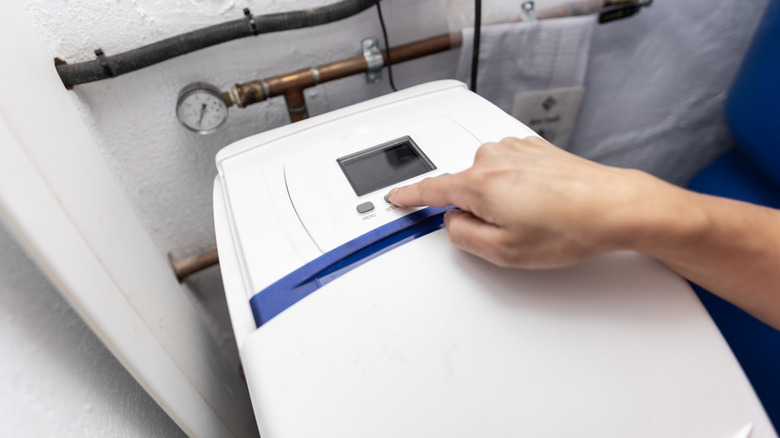
Credit: www.hunker.com
What E1 Code Means
The Waterboss water softener shows different error codes on its display. One common code is the E1 code. This code tells you there is a problem that needs attention. Knowing what the E1 code means helps you fix the issue quickly.
Understanding error codes can save time and avoid damage. The E1 code is related to the water softener’s water flow. It is important to act as soon as you see this code.
What Does The waterboss error E1 Code Indicate?
The E1 code means the water flow is too low or stopped. The softener senses this and stops working to protect itself. This can happen if the water supply is off or blocked.
Common Causes Of The E1 Code
Low water pressure is a main cause of the E1 error. A closed valve or a clogged pipe can also cause Waterboss water softener problems. Sometimes, the filter inside the unit is dirty. These all reduce the water flow.
How To Fix The E1 Code
Check the water supply first. Make sure all valves are open. Clean or replace filters if they are dirty. Clear any blockages in pipes or hoses. Restart the unit after fixing the flow.
Preventing The E1 Code
Regular maintenance keeps the water softener working well. Clean filters and check valves often. Watch the water pressure to avoid flow issues. These steps help prevent the E1 error from returning.
Common Causes Of waterboss E1 Error
The E1 error code on a Waterboss water softener signals a problem with the system’s water level sensor. This error stops the softener from working properly. Understanding what causes this issue helps in fixing it quickly. Below are the common reasons that trigger the E1 error code.
#1: Water Level Sensor Malfunction
The sensor that checks the water level may be dirty or broken. Dirt buildup can block the sensor from reading the water level correctly. A damaged sensor cannot send the right signal to the control board.
#2: Low Or No Water In The Brine Tank
If the brine tank has too little water, the sensor will detect a problem. The softener needs a certain water level to operate. Lack of water can cause the E1 error to show up.
#3: Clogged Or Blocked Drain Line
A blocked drain line can cause water to back up. This changes the water level in the tank. The sensor may then read this as an error and show the E1 code.
#4: Faulty Control Board
The control board processes signals from the sensor. If the board has an electrical fault, it may misread sensor data. This can lead to false E1 errors appearing.
#5: Power Supply Issues
Unstable or low power supply affects the softener’s electronics. The sensor and control board need steady power to work. Power problems can trigger the E1 error code.
Step-by-step Quick waterboss e1 error code Fixes
The Waterboss Water Softener E1 code signals a problem that needs a quick fix. Follow these simple steps to solve the issue fast. Each step helps check key parts of your system. Fixing the error can often be done without calling a technician. Stay calm and work through these easy fixes one by one.
Check Salt Levels
Salt is essential for the softener to work well. Low salt causes the E1 code to appear. Open the salt tank and look inside. Add more salt if the level is low. Use only the type of salt recommended by Waterboss. Avoid salt bridges or clumps. Break them up if you find any. Check salt levels every month to avoid errors.
Inspect Water Supply
Your softener needs a steady water supply. A poor flow can trigger the E1 code. Look at the water inlet valve and hose. Make sure nothing blocks the water flow. Clear any debris or kinks in the hose. Check the main water valve is fully open. Inspect the water pressure if problems continue. Proper water flow keeps the softener running smoothly.
waterboss water softener Reset System
Resetting the Waterboss can clear simple errors. Find the reset button on the control panel. Press and hold it for a few seconds. The system will restart and try to work normally. If the E1 code remains, repeat the previous checks. Waterboss e1 error reset helps the softener refresh its settings. Do this after fixing salt and water supply issues.
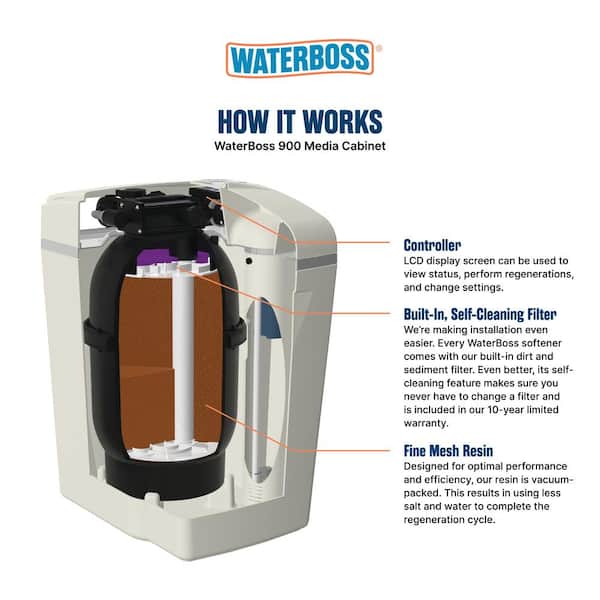
Credit: www.homedepot.com
Preventing waterboss softener problems E1 Errors
Preventing future Water boss softener problems E1 errors on your Waterboss water softener helps keep your system running smoothly. Regular care and checks reduce the chances of errors. Taking simple steps can save time and avoid frustration. A reliable water softener means softer water and less damage to pipes and appliances.
Regular Maintenance Tips
Clean the brine tank every few months. Remove any salt buildup or debris. Check the system for leaks or cracks. Replace worn parts quickly. Keeping your water softener clean stops errors from forming.
Proper Salt Usage
Use the right type of salt for your softener. Avoid rock salt as it can cause clogs. Use high-purity salt pellets or crystals. Do not overfill the salt tank. Proper salt use prevents salt bridges and sensor mistakes.
Routine System Checks
Check the control panel for error messages. Test the water hardness regularly. Make sure the valves and timers work well. Look for unusual noises or leaks. Routine checks catch problems early before they cause Waterboss 900 error code E1.
When To Contact Support
Knowing when to contact support for your Waterboss Water Softener E1 code is important. This error code signals a problem that might need professional help. Acting quickly prevents bigger issues and keeps your water softener working well.
Understanding The E1 Code Severity
The Waterboss e1 error code shows a sensor or flow problem. Sometimes, the Waterboss e1 reset system fixes it. But persistent errors need expert attention. Avoid ignoring the code to protect your appliance.
Repeated Error Codes
If the E1 code returns after resetting, contact support. This means the issue is not temporary. A technician can diagnose the root cause and suggest solutions.
Unusual Noises Or Leaks
Strange sounds or leaks with the E1 code need urgent help. These signs show internal damage or blockages. Professional service can prevent water damage and costly repairs.
System Not Regenerating
If your Waterboss stops regenerating and shows E1, call support. Regeneration is key for softening water. Failure affects water quality and appliance life.
When Safety Is A Concern
Any electrical smells or sparks along with E1 require immediate support. Safety must come first. Avoid using the unit until a technician inspects it.
Expert Advice For Optimal Performance
To get the best from your Waterboss Water Softener, follow expert advice. Proper care and setup help avoid common errors like the E1 code. This code often signals a flow or sensor issue.
Understanding how to choose and install your softener reduces these problems. Good maintenance and setup keep your water softener running smoothly.
Choosing The Right Water Softener Model
Select a model that fits your home size and water use. Check the capacity, measured in grains, to match your water hardness. Consider the space where you will place the unit.
Some models work better in small areas. Look for easy-to-use controls and clear error codes. This helps you manage problems like the Waterboss e1 troubleshooting quickly.
Waterboss Water Softener Installation Best Practices
Install the softener on a flat, stable surface near the main water line. Avoid direct sunlight and freezing temperatures. Use the right pipes and fittings to prevent leaks.
Follow the manufacturer’s instructions step by step. Test the system after installation to catch issues early. Proper setup reduces errors and extends unit life.

Credit: www.youtube.com
Frequently Asked Questions
What Does The Waterboss E1 Error Code Mean?
The Waterboss E1 code signals a low salt level in the brine tank. It indicates the softener needs salt refilling to function correctly. Prompt salt addition prevents regeneration issues and maintains water softness.
How To Fix The Waterboss E1 Code Quickly?
Refill the brine tank with the appropriate salt type. Check for salt bridges or blockages that prevent salt from dissolving. Restart the system after fixing salt issues to clear the E1 error.
Can E1 Code Damage The Waterboss Softener?
The E1 code itself doesn’t cause damage but signals low salt. Ignoring it leads to poor water softening and potential resin damage over time. Timely salt refilling protects the unit’s longevity and efficiency.
How Often Should I Add Salt To Avoid E1 Errors?
Salt addition frequency depends on water usage and hardness. Generally, check salt levels monthly and refill when below half full. Regular maintenance prevents E1 errors and ensures consistent soft water supply.
Conclusion
The Waterboss Water Softener E1 code signals a problem to fix. Check for common issues like salt bridges or sensor errors. Regular maintenance helps prevent this error. Acting quickly keeps your water softener working well. Clear water and smooth appliance function depend on it.
Understanding the E1 code saves time and hassle. Keep your system running with simple checks. Stay aware and handle problems fast. Your water quality deserves proper care every day.