
If you’ve noticed hard water stains or your soap isn’t lathering well, it might be time to adjust your water softener settings. Changing these settings can improve your water quality and save you money on repairs and cleaning.
But don’t worry, it’s easier than you think. In this guide, you’ll learn simple steps to customize your water softener for your home’s needs. Keep reading to take full control of your water and enjoy softer, cleaner water every day.
Credit: www.youtube.com
Check Your Water Softener Model
Before changing your water softener settings, check the model. Different models have different controls and features. Knowing your model helps you adjust settings correctly. It also prevents mistakes and saves time.
Locate The Control Panel
Find the control panel on your water softener. Usually, it is on the front or top of the unit. Look for buttons, dials, or a digital display. This panel is where you change the settings.
Some older models have simple knobs. Newer ones might have touch screens. Knowing the panel type helps you understand how to set it.
Identify Model-specific Features
Check the model number on a label or sticker. This number is often on the side or back of the softener. Use it to search for the user manual online.
Different models have unique features. Some have timers, others adjust hardness automatically. Knowing your model’s features guides you on what settings to change.
Understanding these features ensures you make the right adjustments. It also helps you avoid damaging the system.

Credit: waterestore.ca
Gather Necessary Tools
Gathering the right tools is the first step to change your water softener settings. Having everything ready saves time and avoids frustration. It also helps you work safely and correctly.
List Of Common Tools Needed
You will need a few basic tools. A flathead screwdriver is essential for adjusting dials or opening panels. A Phillips screwdriver helps with screws that have a cross shape. Keep a small adjustable wrench handy to loosen or tighten fittings.
A flashlight is useful in dim areas around the softener. Have a notebook or paper to write down current settings. This way, you can return to the original settings if needed. Some models may require a user manual or guide for specific instructions.
Safety Precautions
Before starting, always turn off the water supply to the softener.
This prevents leaks and water damage. Unplug the unit to avoid electric shock. Work in a dry area to reduce risks.
Wear gloves to protect your hands from dirt and chemicals. Avoid forcing any parts to prevent damage. Read the safety instructions in the manual carefully. Keep children and pets away from the work area.
Adjust Hardness Settings
Adjusting the hardness settings on your water softener is key for better water quality. It controls how much hardness the softener removes. Proper settings save salt and improve appliance life. Follow simple steps to set the right hardness level for your home.
Determine Current Water Hardness
Start by testing your water hardness. Use a water test kit or send a sample to a lab. Check the hardness level in grains per gallon (gpg) or parts per million (ppm). Knowing this helps set your softener correctly.
Set Appropriate Hardness Level
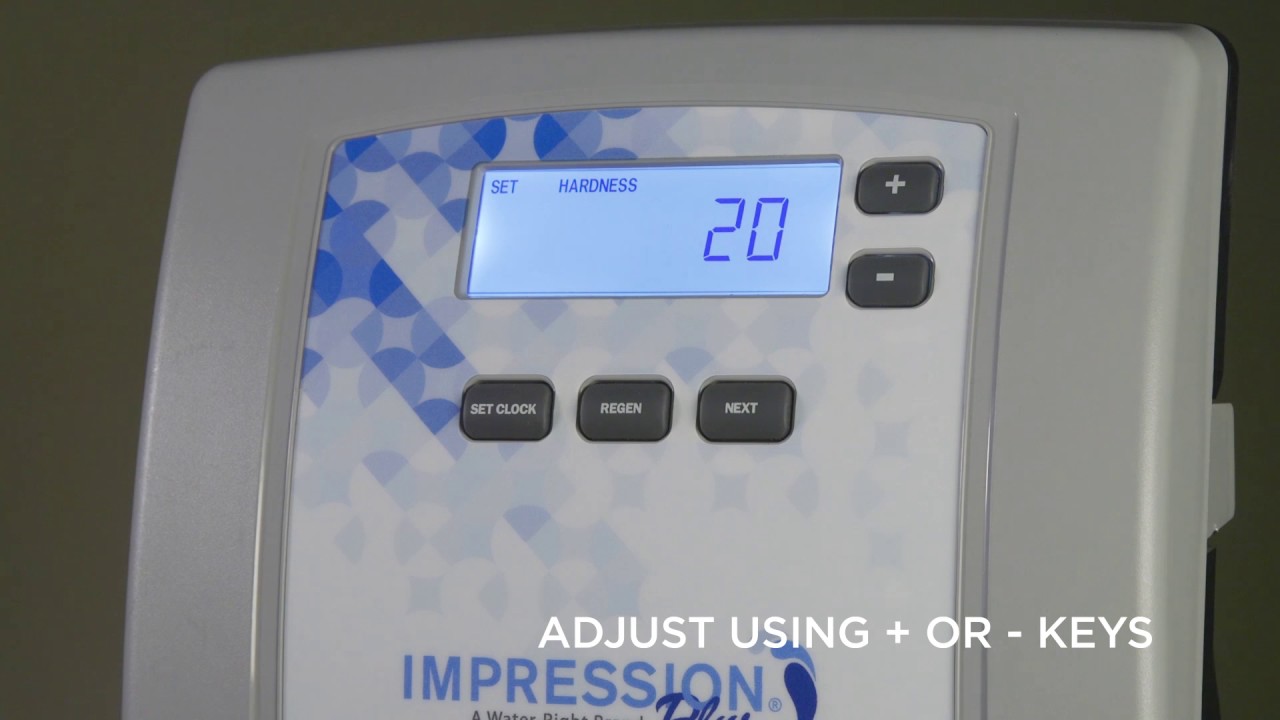
Find the control panel on your water softener. Use the manual to locate hardness settings. Enter the hardness number from your test results. Set the level to match your water’s hardness exactly. This ensures the softener works efficiently without wasting salt.
Modify Regeneration Frequency
Modifying the regeneration frequency of your water softener helps keep it running efficiently. It controls how often the system cleans itself. Adjusting this setting saves salt and water. It also ensures soft water is always available for your home.
Understand Regeneration Cycles
Regeneration cycles flush out hard minerals from the resin beads. The system uses salt water to clean the resin. This process restores the beads’ ability to soften water. Each cycle uses water and salt. Setting cycles too often wastes resources. Setting them too rarely causes hard water buildup.
Set Regeneration Time And Interval
Choose a time when water use is low, like late at night. This prevents interruption during busy hours. Set the interval based on your water hardness and daily use. For example, every three to seven days is common. Check your water usage and salt consumption to adjust properly. Follow your water softener’s manual for specific steps.
Set The Clock And Time
Setting the clock and time on your water softener is important. The system uses this to know when to start its cleaning cycle. A correct time setting saves salt and water. It also keeps your softener working well.
Syncing The Timer
First, find the clock or timer button on your softener. Press it to enter the time setting mode. Use the arrows or plus/minus buttons to set the correct hour. Then, set the minutes the same way. Make sure to set AM or PM correctly. Check the time twice to avoid mistakes. Press the clock button again to save your settings.
Adjust For Daylight Saving
Daylight saving changes the time by one hour. Change your softener’s clock forward or backward by one hour. This keeps the cleaning cycle at the right time. Some models adjust time automatically. If yours does not, change the time manually. Do this twice a year to keep your softener on track.
Test And Monitor Water Quality
Testing and monitoring water quality is key after changing your water softener settings. It shows if the softener works correctly. It also helps catch problems early. Regular checks keep water safe and clean for daily use.
Conduct Water Softness Test
Start by testing water softness using test strips or kits. Dip the strip in water and wait for the color change. Compare the color with the chart provided. This tells how much hardness remains in the water. Test several times to get accurate results.
Fine-tune Settings If Needed
Adjust the softener settings based on test results. Increase regeneration time or salt level for harder water. Lower settings if water feels too soft or slippery. Small changes improve water quality and save salt. Repeat testing after adjustments to confirm improvements.
Troubleshoot Common Issues
Troubleshooting common issues with your water softener can save time and money. Many problems arise from simple mistakes or settings errors. Knowing basic fixes helps keep your system running smoothly.
Start by checking the settings and system response. Some problems clear up after a quick reset. Other times, the issue may need expert care. Below are key tips for troubleshooting common problems.
Resetting The System
Resetting the water softener can fix minor glitches. Locate the reset button or switch on the control panel. Hold the button for a few seconds until the system restarts.
This process clears temporary errors in the programming. Watch the display to see if the system returns to normal. Resetting often fixes issues like incorrect regeneration times or error codes.
If problems persist after resetting, check your settings again. Make sure the hardness level and timer are correct. Resetting is a simple first step to clear most common errors.
When To Call A Professional
Some problems require expert help. Call a professional if you hear strange noises or see leaks. If the system fails to regenerate or shows persistent error codes, seek service.
Complex issues like salt bridge formation or motor failure need special tools. Professionals can diagnose and fix these safely. Regular maintenance visits can prevent major problems too.
Don’t delay professional help if basic fixes do not work. Proper repairs keep your water softener efficient and extend its life.

Credit: nelsonwater.com
Conclusion
Changing your water softener settings is easier than you think. Follow the steps carefully and take your time. Check the settings regularly to keep water soft and clean. Adjustments help save salt and water, which is good for your home.
Don’t forget to read your softener’s manual for specific tips. Small changes can make a big difference in water quality. Keep your system working well for a long time. Simple care brings great results.